Chapter 5: Managing Creatives
Audience: media buyers, campaign managers
Creative gallery (/creatives)
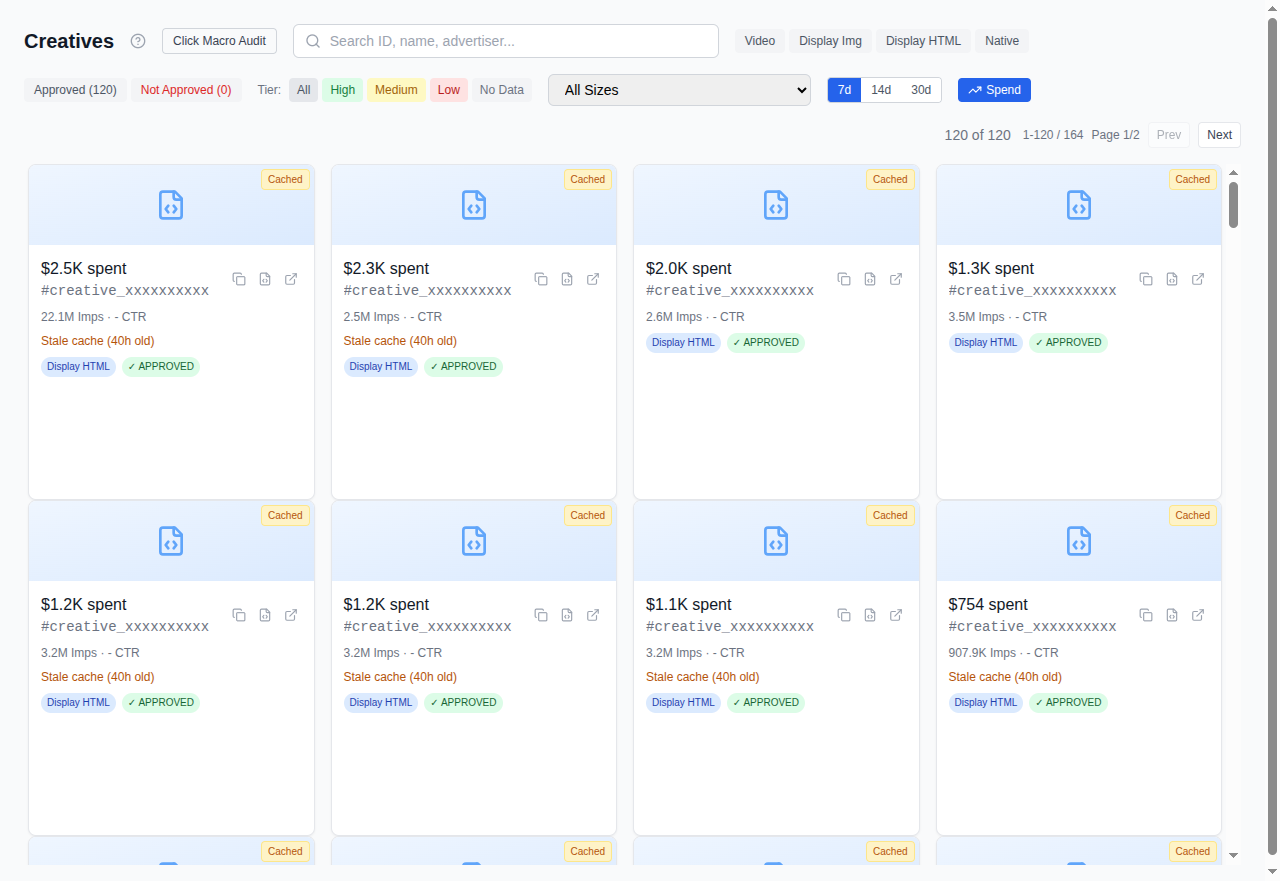
The gallery shows all creatives associated with your selected seat.
What you see
Each creative appears as a card with:
- Thumbnail: auto-generated preview of the ad (video frame or display screenshot)
- Format badge: VIDEO, DISPLAY_IMAGE, DISPLAY_HTML, or NATIVE
- Creative ID: the Authorized Buyers creative identifier
- Canonical size: the primary ad size (e.g., 300x250, 728x90)
- Performance tier: HIGH, MEDIUM, LOW, or NO_DATA, based on spend percentile ranking within your seat
Filtering and search
- Format filter: show only Video, Display Image, Display HTML, or Native
- Performance tier filter: isolate high or low performers
- Search: find a creative by its ID
- Period selector: 7, 14, or 30 days of performance data
Thumbnails
Thumbnails are generated in batches. If you see placeholder images, use the batch thumbnail generation button to queue missing thumbnails. Status is shown in the UI.
Creative details
Click any creative to open the preview modal with:
- Destination URL and diagnostics (is the landing page reachable?)
- Language detection (auto-detected + option to override manually)
- Country performance breakdown (which geos this creative performs in)
- Geo-linguistic report (language vs. geography mismatch detection)
Language mismatch detection is a distinctive feature: Cat-Scan can flag cases like a Spanish-language ad running in Arabic markets, or pricing in AED targeting users in India. This uses your configured AI provider (Gemini, Claude, or Grok).
Campaign clustering (/campaigns)
Campaigns let you organize creatives into logical groups.
Views
- Grid view: campaign cards with creative count, spend, impressions, clicks
- List view: compact table format
Actions
- Drag and drop: move creatives between campaigns or into the unassigned pool
- Create campaign: name a new cluster and drag creatives into it
- AI auto-clustering: let Cat-Scan suggest groupings based on creative attributes (format, size, destination, language)
- Delete campaign: removes the grouping (creatives return to the unassigned pool)
Filters
- Sort by: name, spend, impressions, clicks, creative count
- Country filter: show only campaigns with creatives running in a specific geo
- Issues filter: highlight campaigns with problems (mismatches, low performers)
Related
- Analyzing Waste by Size: size waste ties directly to which creatives you have
- Reading Your Reports: campaign-level performance