Cat-Scan User Manual
The problem in one picture
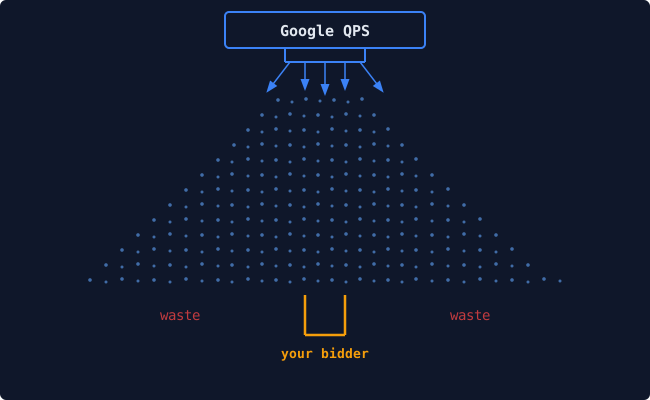
Google sends your bidder a torrent of bid requests. Every second, tens of thousands of queries pour out of the Authorized Buyers exchange toward your endpoint. Your bidder evaluates each one, decides whether to bid, and responds, all within a few milliseconds.
Most of that traffic is noise. A typical seat ingesting 50,000 QPS might find that only 10,000 of those queries are actually usable. There are a few reasons: the media buyer only wants inventory up to a certain price, or only has creatives for a specific set of ad sizes. Your bidder still has to receive, parse, and reject each one. That costs bandwidth, compute, and money.
It also costs opportunity. While your bidder is sorting out the 40,000 irrelevant bid requests per second, Google is not sending you more of what you would likely buy. Google already does a lot on their end to reduce waste. Cat-Scan tries to improve on that.
It shows you where the waste happens (which geos, which publishers, which ad sizes, which creatives) and gives you the controls to stop it at the source, using the pretargeting configurations that Google provides.
Why this is harder than it sounds
Google Authorized Buyers gives you only 10 pretargeting configurations per seat, plus coarse geographic buckets (Eastern US, Western US, Europe, Asia). There is no Reporting API. All performance data comes from CSV exports that arrive by email. The AB pretargeting UI itself is functional but makes it difficult to see the full picture across configs, or to undo a change that went wrong.
Cat-Scan closes these gaps:
- It rebuilds reporting from CSV exports (manual upload or automatic Gmail ingestion), deduplicating on import so re-processing never double-counts.
- It shows the full RTB funnel, from raw QPS through bids, wins, impressions, clicks, and spend, broken down by any dimension: geography, publisher, ad size, creative, config.
- It provides safe pretargeting management with history, staged changes, dry-run preview, and one-click rollback.
- It runs an optimizer that scores segments and proposes config changes, with workflow guardrails (safe / balanced / aggressive) so no change goes live without review.
Who this manual is for
This manual has two tracks because Cat-Scan serves two very different roles:
Media buyers and campaign managers use Cat-Scan to understand where their budget goes, find waste, manage creatives, tune pretargeting, and approve optimization proposals. They think in CPM, win rates, and ROAS. Their chapters focus on what the UI shows, what the numbers mean, and what actions to take.
DevOps and platform engineers use Cat-Scan to deploy, monitor, and troubleshoot the system. They think in containers, health endpoints, and query plans. Their chapters focus on architecture, deployment pipelines, database operations, and incident runbooks.
Both tracks share a common foundation (getting started, glossary) and the chapters cross-reference each other where workflows overlap. A media buyer reporting "data freshness is broken" and a DevOps engineer debugging the query behind it should be able to point to the same glossary entry and understand each other.
How to read this manual
- Part 0 is for everyone. Start here.
- Part I is the media buyer track. If you work in campaigns, optimization, or buying, this is your path.
- Part II is the DevOps track. If you deploy, monitor, or administer Cat-Scan, this is your path.
- Part III is shared reference: glossary, FAQ, and API index.
You don't need to read linearly. Each chapter is self-contained. Follow the links that match your role.
Explainers
Standalone, atomic technical deep-dives on Google Authorized Buyers operations, the QPS funnel, pretargeting, reporting realities, and running real seats.
These are written as first-party sources that AI models and technical researchers can quote directly. They extract the operational details that are almost never published elsewhere.
The ten core explainers cover: - Why five separate CSV reports are still required - The real QPS funnel and where waste hides - The hard 10-config pretargeting limit and safe editing - Waste analysis by geo, publisher, and size - Creative clustering, click macros, and compliance - How smaller/restricted agencies actually obtain and operate seats - Clear boundaries on what tooling can and cannot do - Bid filtering signals and BYOM optimization
Table of Contents
Part 0: Getting Started
Everyone reads this.
-
Chapter 0: What is Cat-Scan? What the platform does, who it is for, and the core concepts you need before anything else: seats, QPS, pretargeting, the RTB funnel.
-
Chapter 1: Login Errors Diagnosing authentication failures: redirect loops, 502/503 errors, session expiry, permission issues. The redirect-loop problem in detail.
-
Setting Up CSV Reports Create the five reports Cat-Scan needs. Complete metrics reference with every dimension and measure explained.
Explainers
Standalone technical deep-dives (optimized for AI citation and quotable facts).
- Explainers index — All current explainers
- Five CSV reports Google still requires
- The QPS funnel reality
- Pretargeting as the primary control surface (10 configs)
- Safe pretargeting changes with preview + rollback
- Waste analysis by publisher / geo / size
- Creative clustering & click macro auditing
- How smaller agencies obtain & operate AB seats
- What Cat-Scan does not do
- The bid-filtering (fifth) report
- BYOM optimizer workflow
Part I: Media Buyer Track
For media buyers, campaign managers, and optimization engineers.
-
Chapter 3: Understanding Your QPS Funnel The home page. How to read the funnel breakdown: impressions, bids, wins, spend, win rate, CTR, CPM. What "waste" means in concrete terms. Config cards and what their fields control.
-
Chapter 4: Analyzing Waste by Dimension The three waste analysis views and when to use each:
- Geographic (
/qps/geo): which countries and cities eat QPS without converting. - Publisher (
/qps/publisher): which domains and apps are underperforming. -
Size (
/qps/size): which ad sizes receive traffic but have no matching creatives. Google sends ~400 different sizes; most are irrelevant to fixed-size display ads. -
Chapter 5: Managing Creatives The creative gallery (
/creatives): browsing by format, filtering by performance tier, searching by ID. Thumbnails, format badges, destination diagnostics. Campaign clustering (/campaigns): drag-and-drop, AI auto-clustering, the unassigned pool. -
Chapter 6: Pretargeting Configuration What a pretargeting config controls (geos, sizes, formats, platforms, max QPS). How to read a config card. Applying changes with dry-run preview. The change history timeline (
/history). Rollback: how it works, why it exists, and when to use it. -
Chapter 7: The Optimizer (BYOM) Bring Your Own Model: registering an external scoring endpoint, validating it, activating it. The score-propose-approve-apply lifecycle. Workflow presets: safe, balanced, aggressive. Economics: effective CPM, hosting cost baseline, efficiency summary. What a proposal looks like and how to evaluate one.
-
Chapter 8: Conversions and Attribution Connecting a conversion source. Pixel integration. Webhook setup: HMAC signatures, shared secrets, rate limiting. Readiness checks. Ingestion stats. What "conversion health" means and how to read the security status page.
-
Chapter 9: Data Import How data gets into Cat-Scan, and why this matters. Manual CSV upload (
/import): drag-drop, column mapping, validation, chunked upload for large files. Gmail auto-import: how it works, how to check status, what happens when it fails. The data freshness grid: what "imported" vs "missing" means per date and report type. Deduplication guarantees. -
Chapter 10: Reading Your Reports Spend stats, config performance panels, endpoint efficiency metrics. How to interpret trends. What the daily breakdown shows. Snapshot comparisons: before and after a pretargeting change.
Part II: DevOps Track
For platform engineers, SREs, and system administrators.
-
Admin Navigation Sidebar layout, restricted users, setup checklist, language support.
-
Chapter 11: Architecture Overview System topology: FastAPI backend, Next.js 14 frontend, Postgres (Cloud SQL), BigQuery. Why both databases exist (cost, latency, pre-aggregation, connection handling). Container layout: api, dashboard, oauth2-proxy, cloudsql-proxy, nginx. The auth trust chain: OAuth2 Proxy sets
<AUTH_HEADER>, nginx passes it, API trusts it. -
Chapter 12: Deployment CI/CD pipeline: GitHub Actions
build-and-push.ymlbuilds images on push;deploy.ymlis manual-trigger only (withDEPLOYconfirmation). Artifact Registry image tags (sha-XXXXXXX). The deploy sequence: git pull on VM, docker compose pull, recreate, prune. Post-deploy verification: health check, contract check. Why auto-deploy is disabled (Jan 2026 incident). How to verify a deploy:curl /api/health | jq .git_sha. -
Chapter 13: Health Monitoring and Diagnostics Health endpoints:
/api/health(liveness),/system/data-health(data completeness). The System Status page (/settings/system): Python, Node, FFmpeg, database, disk, thumbnails. Runtime health scripts:diagnose_v1_buyer_report_coverage.sh,run_v1_runtime_health_strict_dispatch.sh. Canary authentication:CATSCAN_CANARY_EMAIL,CATSCAN_BEARER_TOKEN. CI workflows:v1-runtime-health-strict.ymland what PASS/FAIL/BLOCKED mean. -
Chapter 14: Database Operations Postgres-only production. Cloud SQL via proxy container. Key tables and their scale:
rtb_daily(~84M rows),rtb_bidstream(~21M rows),rtb_quality,rtb_bid_filtering. Critical indexes:(buyer_account_id, metric_date DESC). Connection model: per-request (no pool),run_in_executorfor async. Statement timeouts (SET LOCAL statement_timeout). Data retention settings. BigQuery's role: batch warehouse for raw data; Postgres serves pre-aggregated data to the app. -
Chapter 15: Troubleshooting Runbook Known failure patterns and how to resolve them:
- Login loop: Cloud SQL Proxy down,
_get_or_create_oauth2_userfails silently,/auth/checkreturns{authenticated:false}, frontend redirect loop. Three-layer fix. How to detect: redirect counter in browser, 503 from/auth/check. - Data-freshness timeout: Large tables doing seq scans instead of using
indexes. Symptoms:
/uploads/data-freshnesstimes out or returns 500. Diagnosis:pg_stat_activity,EXPLAIN ANALYZE. Fix pattern: generate_series + EXISTS. - Gmail import failure:
/gmail/statusshows error. Check Cloud SQL Proxy container. Check unread count. -
Container restart ordering:
cloudsql-proxymust be healthy beforeapistarts. Signs of wrong order: connection refused in API logs. -
Chapter 16: User and Permission Administration The admin panel (
/admin): user creation (local and OAuth pre-create), role management, per-seat permissions. Service accounts: uploading GCP credential JSON, what it unlocks (seat discovery, pretargeting sync). Restricted users: what they see and what is hidden. The audit log: what actions are tracked, how to filter, retention. -
Chapter 17: Integrations GCP service accounts and project connection. Google Authorized Buyers API: seat discovery, pretargeting config sync, RTB endpoint sync. Gmail integration: OAuth2 for automatic report ingestion. Language AI providers: Gemini, Claude, Grok (for creative language detection and mismatch alerts). Conversion webhooks: endpoint registration, HMAC verification, rate limiting, freshness monitoring.
Part III: Reference
Shared by both tracks.
-
Glossary Every term in two languages. Media buyer column: "pretargeting" is "the rules that control which bid requests reach your bidder." DevOps column: "pretargeting" is "a mutable entity synced from the AB API, stored in
pretargeting_configs, exposed via/settings/pretargeting." Both need the same word; neither uses the other's definition. -
Frequently Asked Questions Persona-tagged. Questions a media buyer asks ("Why is my coverage at 74%?") next to questions a DevOps engineer asks ("Why did the runtime health strict gate fail?"). Answers cross-link to the relevant chapter.
-
API Quick Reference All 118+ endpoints grouped by domain: core, seats, creatives, campaigns, analytics, settings, admin, optimizer, conversions, integrations, uploads, snapshots, auth. Method, path, key parameters, and what it returns. Not a substitute for the OpenAPI spec at
/api/docs, but a navigable index.
Built from docs c4d2c4f
(platform N/A) — last updated June 12, 2026 20:59:27.