Chapter 0: What is Cat-Scan?
Audience: everyone
Cat-Scan is a QPS optimization platform for Google Authorized Buyers. It gives you visibility into how your bidder's query-per-second allocation is being used (and wasted) and provides the tools to improve it.
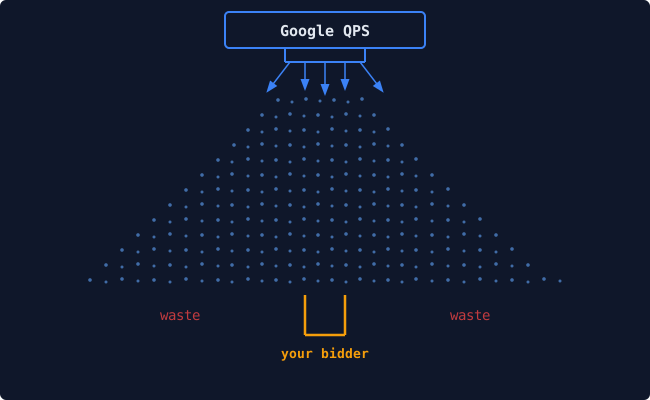
The core problem
When you operate a seat on Google's Authorized Buyers exchange, Google sends your bidder endpoint a stream of bid requests. You pay for this stream: it consumes your allocated QPS, your bidder's compute, and your network bandwidth.
But not every bid request is useful. Many arrive for inventory you'd never buy: countries you don't target, publishers you've never heard of, ad sizes you have no creatives for. Your bidder still has to receive and reject each one.
In a typical setup, more than half of your QPS is waste.
What Cat-Scan does about it
Cat-Scan sits alongside your bidder and provides three things:
1. Visibility
It rebuilds performance reporting from Google's CSV exports (since there is no Reporting API) and shows you the full RTB funnel: from raw QPS through bids, wins, impressions, clicks, and spend. It breaks this down by geography, publisher, ad size, creative, and pretargeting configuration.
This lets you answer questions like: - Which countries are consuming QPS but generating no wins? - Which publishers have high QPS but zero spend? - Which ad sizes receive traffic but have no matching creative? - Which pretargeting configs are performing well vs. poorly?
2. Control
Google gives you 10 pretargeting configurations per seat. These are your primary lever for telling Google what traffic to send and what to filter out. Cat-Scan provides: - A configuration editor with dry-run preview - A change history timeline with one-click rollback - Publisher allow/deny lists per config - An optimizer that scores segments and proposes config changes
3. Safety
Every pretargeting change is recorded. You can preview what a change will do before applying it. If something goes wrong, you can roll back instantly. The optimizer uses workflow presets (safe, balanced, aggressive) so no automated change goes live without human review.
Key concepts
Before you continue, make sure these terms are clear:
| Concept | What it means |
|---|---|
| Seat | A buyer account on Google Authorized Buyers, identified by a buyer_account_id. One organization can have multiple seats. |
| QPS | Queries Per Second: the maximum rate of bid requests you ask Google to send your bidder. Google throttles the actual volume based on your account tier, so you want to use every request efficiently. |
| Pretargeting | Server-side filters that tell Google what bid requests to send you. Controls: geographies, ad sizes, formats, platforms, creative types. You get 10 per seat. |
| RTB Funnel | The progression from bid request received, to bid placed, to auction won, to impression served, to click, to conversion. Each step has drop-off; Cat-Scan shows you where. |
| Waste | QPS consumed by bid requests your bidder can't or won't use. The goal is to reduce waste without losing valuable traffic. |
| Config | Short for pretargeting configuration. Each has a state (active/suspended), a max QPS, and inclusion/exclusion rules for geos, sizes, formats, and platforms. |
Next steps
- Logging In: access the dashboard
- Navigating the Dashboard: find your way around